Vendor Onboarding Checklist: How to Verify Every New Supplier Before the First Payment
Every year, tens of thousands of organisations pay the wrong vendor. Not because they were hacked. Not because their systems failed. Because someone submitted fraudulent bank details during onboarding — or changed them later — and nobody verified independently.
Vendor onboarding is the moment your organisation decides who it trusts with its money. Most processes aren't designed with that weight in mind. A vendor emails over their details, AP enters them into the ERP, someone approves it, and payments start flowing. If a W-9 or bank form was attached to the email, it gets filed. Job done.
That process has three structural weaknesses. It relies on email — the most compromised communication channel in B2B payments. It verifies what vendors claim about themselves, not what official sources confirm. And it treats onboarding as a one-time event, when the highest-risk moment — a bank detail change — happens after onboarding is "complete."
This guide covers what to verify at every stage, where most checklists fail, and how to build a process that holds up when a fraudster tests it.
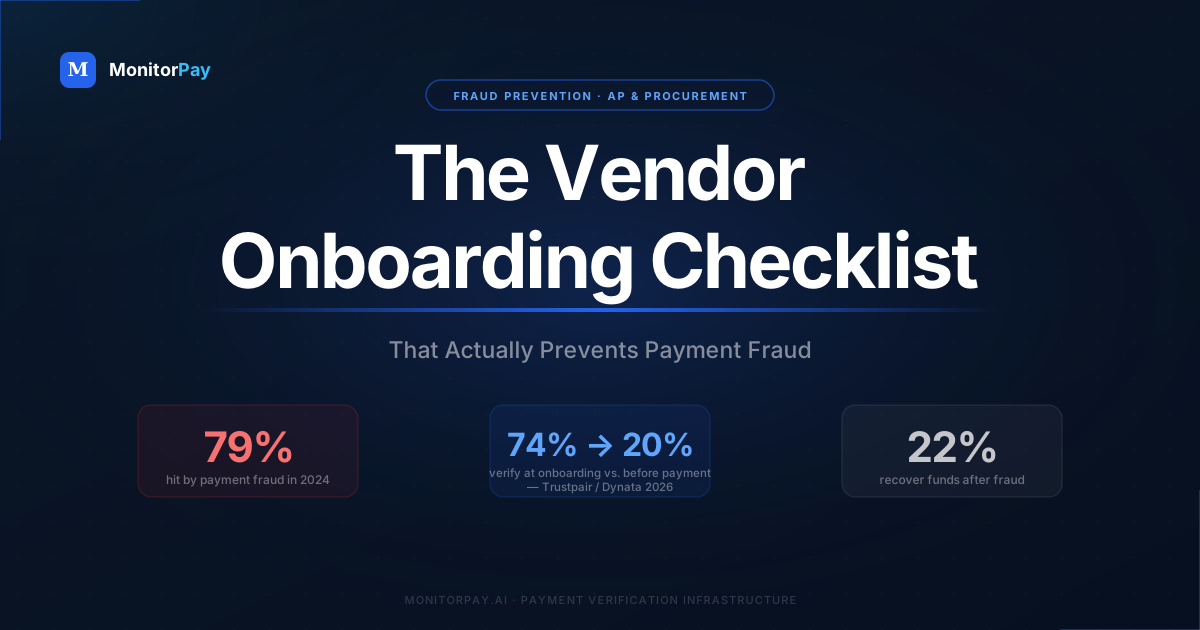
The 54-point drop between onboarding and payment verification is where most vendor fraud goes undetected.
Why most onboarding processes leave the door open
The fundamental problem isn't that AP teams are careless. It's that most vendor onboarding processes were designed for efficiency, not security. They're optimised to get vendors live quickly, not to catch sophisticated fraud.
When a fraudster submits bank details during onboarding, they're not trying to beat your IT security. They're trying to beat your process — which in most organisations means submitting a form, waiting for an email reply, and hoping no one calls.
That 54-point drop is the gap where fraud lives. A vendor can be thoroughly verified in January and have their bank account silently redirected in March. If nobody re-checks before the April payment run, the money goes to the wrong account. By the time the real vendor chases an overdue invoice, the funds are gone.
From June 22, 2026: Nacha's fraud monitoring rules require all non-consumer ACH Originators to verify bank account ownership using independent data sources — not self-reported submissions. A vendor onboarding process without account ownership verification is no longer just a fraud risk. For any business sending US ACH payments, it is a compliance gap.
The four fraud types that enter through your onboarding process
Each of these attacks targets a different moment in the vendor lifecycle. Understanding which stage each one exploits tells you exactly which controls to build — and why no single check is sufficient on its own.
Ghost vendor / fictitious supplier
A fraudster — often an insider — creates an entirely fictitious vendor in the system. The company name, tax ID, and bank account are all fabricated. Invoices are raised and paid. The vendor never existed. This attack is stopped by entity verification against official company registries before any payment is made.
Bank detail substitution at onboarding
A real, existing company is impersonated. The fraudster submits accurate company information — correct legal name, real registration number — but replaces the bank account with one they control. Every check passes except the one that matters: does this account actually belong to this company? Without account ownership verification, the substitution is invisible.
BEC vendor impersonation
A fraudster compromises or spoofs a known vendor's email address and contacts your AP team requesting a bank account update. The vendor is real. The email looks authentic. Only the destination account has changed. Business Email Compromise is now the top reported fraud vector, affecting 63% of organisations. It almost always targets vendor bank details specifically.
Bank detail change fraud
A long-standing, fully verified vendor has their bank details changed after onboarding — via email, a portal request, or a phone call — to an account controlled by a fraudster. All subsequent payments are silently redirected. This variant is particularly dangerous because it bypasses the onboarding process entirely and often goes undetected for 60 days or more, until the real vendor chases an overdue invoice.
What this looks like in practice — a real example
In 2023, the Cleveland Public Library transferred nearly $400,000 to a fraudulent account as part of a vendor bank redirect scam. The scheme worked because, as Ohio State Auditor Keith Faber noted in his findings, the library had failed to adopt proper verification processes for vendor information changes. A contractor submitted updated bank details. Staff processed the change. Payments went out. The library didn't discover the fraud until the real contractor followed up on missing invoices.
This is not an isolated case involving an under-resourced public institution. The same attack pattern has hit manufacturers, law firms, healthcare networks, and global technology companies. In 2019, Toyota's European subsidiary lost $37 million after a fraudster impersonated a company executive and convinced staff to change a vendor's bank account details. The attack required no system access, no malware, and no technical sophistication — just a convincing email and a process that had no independent verification step.
The median loss per vendor fraud incident in 2024 was $120,000, according to AFP data. That figure covers organisations of all sizes. For mid-market companies without dedicated fraud teams, a single incident at that scale is not a recoverable line item. It shows up in annual results, triggers audits, and in some cases ends careers in finance leadership.
Recovery is near-impossible once the payment leaves. ACH credits and wire transfers are not automatically reversible. Your bank can attempt a recall, but the receiving bank is under no obligation to return the funds — and fraudsters typically move money within hours of receipt. Only 22% of organisations recover most of their losses. The other 78% absorb the full amount.
Most vendor bank fraud goes undetected for 60+ days. By the time the real vendor calls, multiple payments have already left.
The vendor onboarding checklist — stage by stage
The six stages below are sequential. A clean result at Stage 1 does not compensate for skipping Stage 3. Every check should produce a logged, timestamped record — not just a mental note. That audit trail is what protects you in a dispute and what Nacha examiners and internal auditors now expect to see.
Stage 1 — Entity verification
Before you accept a single bank detail, confirm the business is legally registered, active, and is who they claim to be. This means checking against official company registries — not trusting the vendor's own submission or a Google search. A dissolved entity or a shell company will pass a visual check and fail a registry lookup.
- Legal name — matches the name on file with the relevant company registry, not a trading or brand name
- Company registration number — verified against the official registry for the country of incorporation
- Active status — the company is not dissolved, struck off, dormant, or under administration
- Registered address — matches the official address on record, not just what the vendor submitted
- Directors and UBO — named directors or ultimate beneficial owners confirmed; flag opaque ownership structures or registration in high-risk jurisdictions
- Incorporation date — flag companies incorporated less than 90 days ago that are submitting large first invoices
- No duplicate vendor — the same company name, registration number, or address does not already exist in your vendor master under a different record
For marketplace and platform onboarding at scale, MonitorPay has a detailed guide on KYB verification for marketplaces — covering how to verify seller identity and bank accounts before the first payout.
Stage 2 — Tax and regulatory verification
Tax ID verification does two things at once: it confirms the vendor is who they claim to be at a government level, and it protects your organisation from downstream tax penalties for paying entities you cannot identify. The specific check differs by region — the principle is the same everywhere.
- US vendors — EIN verification via IRS TIN matching: the Employer Identification Number matches the legal name on file with the IRS. Mismatches trigger IRS CP2100 notices and costly remediation. See MonitorPay EIN Check.
- EU vendors — VAT verification via EU VIES: VAT number confirmed active and company name matches the registration. See MonitorPay VAT Check.
- UK vendors — VAT verification via HMRC: UK VAT number confirmed and cross-referenced with Companies House. See MonitorPay VAT Check.
- US vendors — W-9 collection: W-9 on file, TIN matches legal name, required for 1099 reporting
- Non-US vendors receiving US payments — W-8 collection: appropriate W-8 form on file to establish foreign status for withholding purposes
- Sanctions screening: vendor name, UBO, and jurisdiction screened against OFAC SDN list, EU Consolidated List, and UN Security Council List
Stage 3 — Bank account verification
This is the most critical stage in the entire checklist, and the one most organisations treat as an afterthought. Entity verification tells you the company is real. Bank account verification tells you the account you're about to pay actually belongs to that company. Without it, a fraudster can pass Stages 1 and 2 entirely and still redirect every payment.
Never accept bank details submitted via email alone. Email is spoofable, hackable, and provides no independent confirmation of who controls an account. Use a secure portal and always verify ownership against a banking data source — not against what the vendor told you.
- IBAN validation: confirm the IBAN is correctly formatted and corresponds to a real, active account. See MonitorPay IBAN Validation.
- Account ownership verification: confirm via independent banking data that the account number and routing or sort code belong to the legal entity named in your records. This is the specific check that catches bank detail substitution fraud — the company is real, but the account belongs to someone else. See MonitorPay Account Ownership Verification.
- Payee name matching: the account holder name matches the vendor's legal name. Flag close matches for manual review rather than auto-approving. See MonitorPay Payee Name Verification.
- Account active status: the account is not closed, frozen, or flagged for suspicious activity. See MonitorPay Account Status Check.
- No duplicate bank account: this account number does not already exist in your vendor master under a different vendor name
- Out-of-band confirmation for high-value vendors: for first payments above a defined threshold, call the vendor on a number sourced independently — not from their submission — to verbally confirm account details before the first payment
Nacha 2026 compliance: Stage 3 satisfies the Nacha fraud monitoring requirement directly. Account ownership verification using an independent banking data source is the specific control Nacha's False Pretenses rules are designed to mandate — and it produces the auditable log required for Nacha's annual review documentation standard.
Stage 4 — Approval and segregation of duties
The most common insider fraud vector is a single AP team member who can create a vendor record, approve it, and release a payment — with no second pair of eyes at any stage. Segregation of duties is not bureaucracy. It is the structural control that makes insider fraud significantly harder to execute and easier to detect.
- Segregation of duties: the person who creates the vendor record is not the same person who approves it for payment
- Dual approval for new vendor setup: at least two named approvers required before a vendor is activated in the ERP
- System-enforced approval: approvals happen inside the ERP or payment platform, not via email sign-off where the trail can be altered
- All verification checks logged: each Stage 1–3 check has a timestamp, result, and named operator recorded before the vendor is approved
- No first payment without full checklist completion: payment cannot be released until all stages are marked complete in the system, not just acknowledged verbally
Stage 5 — Bank detail change protocol
A bank detail change request from an existing vendor is not routine maintenance. It is the single event most exploited by fraudsters — because it bypasses the full onboarding process entirely and almost always arrives framed as urgent. The correct response is simple: treat every bank detail change as a new onboarding. Run all of Stage 3 again. No exceptions.
Urgency is a red flag, not a reason to skip steps. The most common BEC bank-change attacks include a time pressure element — "please update before today's payment run" or a threat of service interruption. Any request that creates pressure to skip verification is more likely to be fraudulent, not less. AP teams should be explicitly empowered and supported when they slow down urgent change requests.
- Freeze the existing account immediately: place a payment hold on the vendor record upon receiving the request. No payments leave until the process is complete.
- Do not use contact details from the request: source the vendor's phone number from your existing records or a verified public directory. Never call a number provided in the change request email — it may reach the fraudster directly.
- Out-of-band verbal confirmation: call to confirm the request is genuine, the new account details are correct, and the person authorising the change has the authority to do so. Log who you spoke to and when.
- Re-run Stage 3 on the new account: IBAN validation, account ownership verification, payee name matching, and active status check — all repeated on the new account details.
- Dual approval: at least two named approvers must sign off before the vendor record is updated in the ERP.
- Hold period before first payment: a minimum of 3–5 business days between the change being approved and the first payment to the new account. Flag the first payment for manual review.
- Log everything: timestamp of request, source of phone number used, verification results, approver names, and date of first payment to the new account.
Stage 6 — Ongoing monitoring
Onboarding verification tells you a vendor was safe when you added them. Ongoing monitoring tells you they're still safe when you pay them. That distinction — between the moment of onboarding and the moment of payment — is where the 74% → 20% verification drop-off happens. Closing it is what separates a process that merely looks compliant from one that actually prevents fraud.
- Re-verify bank account ownership before large payment runs: for vendors above a defined payment threshold, run account ownership verification before each payment cycle, not just at onboarding. See MonitorPay Continuous Monitoring.
- Monitor for vendor data changes: receive automated alerts whenever bank account, address, or contact details change in your vendor master. See MonitorPay Continuous Monitoring.
- Annual vendor master audit: review all active vendors annually; deactivate those with no activity in 12+ months; re-verify bank details for any vendor reactivated after dormancy.
- Bulk re-validation: for high-volume vendor bases, run periodic bulk validation of all bank accounts against current banking data. See MonitorPay Bulk Validation.
- Treat dormant vendor reactivations as new onboardings: any vendor inactive for 6+ months passes all six stages again before the first payment is released.
International vendor onboarding — what changes by region
Most vendor onboarding guides assume a US-only AP team. If your vendor base spans multiple countries — which it does for almost any mid-market or enterprise business — the verification requirements change by jurisdiction. The bank account format, the tax ID structure, and the relevant registry all differ. The principle doesn't: verify independently, not just from the vendor's submission.
| Region | Entity check | Tax / regulatory | Bank account | Ownership verification |
|---|---|---|---|---|
| 🇺🇸 United States | Secretary of State registry (by state) | EIN verification + W-9 | ABA routing + account number | Account ownership API |
| 🇬🇧 United Kingdom | Companies House | VAT check via HMRC | Sort code + account number | CoP + ownership API |
| 🇪🇺 European Union | National company registry | VAT check via EU VIES | IBAN + BIC/SWIFT | VoP + ownership API |
| 🌏 APAC / Other | Local national registry | Local tax ID (ABN, GST, etc.) | Local account + SWIFT | Account ownership API (190+ countries) |
Red flags to catch during onboarding
These patterns don't confirm fraud on their own — but each one is a signal that warrants a pause and a manual review before any vendor is approved or paid. AP teams should be equipped with this list and empowered to act on it without pressure to move quickly.
- Vendor address is a P.O. box, a residential address, or matches an employee address in your HR system. Common ghost vendor indicator.
- The submitted bank account already exists in your vendor master under a different name. Classic duplicate vendor or insider fraud signal.
- The tax ID is already on file for a different vendor. Same entity trying to enter the system twice, or a fabricated ID clashing with a real one.
- The company was incorporated less than 90 days ago and is submitting a large first invoice. Shell companies and ghost vendors frequently use newly registered entities.
- The contact email domain doesn't match the company's website domain — for example, contact from acme-corp.co when the website is acmecorp.com. Domain spoofing is the first stage of most BEC attacks.
- The first invoice is a round number with a vague service description — "Consulting services — $10,000" with no scope, date range, deliverables, or PO reference.
- The change request comes with urgency pressure — "please update before today's payment run" or a threat of service interruption. Urgency is a deliberate manipulation tactic, not a legitimate reason to skip steps.
- The account ownership check returns a mismatch. The bank account doesn't match the legal entity name in your records. Stop. Do not process the payment until the discrepancy is resolved with independent confirmation from the vendor — not from the channel that submitted the mismatch.
If the fraud has already happened — what to do in the first 72 hours
If you've discovered that a payment went to a fraudulent account, speed is the only variable still in your control. The window for any realistic recovery is measured in hours, not days. Most organisations lose it by spending the first 24 hours in internal escalation meetings rather than taking the actions that could actually stop the transfer.
Step 1 — Call your bank immediately
Call your bank's fraud line — not your relationship manager, not the general customer service number. Ask them to initiate a payment recall or a request for return under the relevant scheme rules (ACH Return, SEPA recall, CHAPS recall). Make clear this is fraud, not an error, and ask them to flag the receiving account. Banks can contact the receiving institution and request the funds be frozen pending investigation, but this only works if the receiving account hasn't already been emptied — which fraudsters typically do within hours. Every minute matters.
Step 2 — Freeze all pending payments to that vendor
Pull up every scheduled or queued payment to the affected vendor and put holds on all of them immediately. If the fraudster has been redirecting payments for weeks without detection, there may be multiple outstanding amounts still in queue. Don't wait for confirmation that the first payment was fraudulent before stopping the rest.
Step 3 — Preserve the evidence chain
Do not delete, move, or "clean up" any emails, portal submissions, or system logs related to the vendor or the change request. Screenshot everything with timestamps before your IT team touches anything. The email thread, the bank change request, the approval log, and the ERP change history are all evidence that your bank, law enforcement, and your insurer will need. Cases have been lost — and insurance claims denied — because staff deleted phishing emails or overwrote vendor records in the cleanup process.
Step 4 — File a report with law enforcement
In the US, file a complaint with the FBI's Internet Crime Complaint Center (IC3) at ic3.gov. The FBI's Recovery Asset Team (RAT) has recovered hundreds of millions in BEC losses — but only for cases reported quickly, where the receiving bank can still act. Also notify your local FBI field office directly if the amount is above $50,000, as they can escalate to the RAT faster than the standard IC3 queue. In the UK, report to Action Fraud. In the EU, report to your national cybercrime unit.
Step 5 — Notify your cyber insurer
If you have a cyber liability or crime insurance policy, notify your insurer within the required notification window — which is typically 24–72 hours of discovery. Missing this window is one of the most common reasons claims are denied. Many policies cover social engineering fraud and BEC-related losses, but coverage is conditional on prompt notification and on you having followed documented procedures. This is another reason the audit trail from your onboarding process matters — insurers will ask for it.
Step 6 — Conduct an internal review before re-enabling payments
Before reactivating the vendor or setting up a replacement account, treat the entire vendor record as compromised. Run all six onboarding stages again from scratch. Verify the new account details through independent channels. The fraudster may still have access to the vendor's email and may attempt a second redirect once they see payments have stopped. Do not skip this step under time pressure from the vendor or from your own finance team.
A note on fund recovery: Domestic ACH payments have a better recovery rate than international wires, because the receiving bank is also a US institution subject to Nacha rules and FBI jurisdiction. International wire transfers that have crossed borders are significantly harder to recover. If the payment was a wire to a foreign bank, your realistic options narrow considerably after the first 24 hours — which is why preventing the payment from leaving in the first place is the only reliable strategy.
Frequently asked questions
At minimum: entity verification (legal name, registration number, active status), tax ID verification (EIN for US, VAT for EU/UK), bank account validation, account ownership verification confirming the account belongs to the named entity, sanctions screening, and dual approval before the vendor is activated. The same checklist should apply to any bank detail change request from an existing vendor — not just new onboardings.
There are three common methods, but only one fully prevents substitution fraud. Micro-deposits confirm an account exists but don't verify who owns it. Pre-notifications confirm account format but not ownership. Real-time account ownership verification — checking that the account number, routing or sort code, and named entity all match via an independent banking data source — is the only method that catches the scenario where a company is real but the account has been swapped. MonitorPay's Account Ownership Verification does this in real time for 190+ countries.
Bank detail substitution — either at onboarding or via a subsequent change request. The company passes every entity and tax check because it's real. The bank account belongs to a fraudster. Every payment from that point goes to the wrong destination. The second highest risk is accepting bank detail changes over email without independent re-verification — which is how the majority of BEC attacks succeed in AP teams.
EIN verification confirms the Employer Identification Number matches the legal business name on file with the IRS via TIN matching. Mismatches trigger IRS CP2100 notices and remediation work. MonitorPay's EIN Check automates this in real time at the point of onboarding.
EU VAT numbers are verified via the EU VIES system, which confirms whether a number is active and returns the registered business name. UK VAT numbers are verified via HMRC. Both checks should confirm the number is active and the business name matches your records. MonitorPay's VAT Check covers both EU VIES and UK HMRC in a single API call.
Treat it as a new onboarding. Place a payment hold immediately. Source the vendor's phone number from your existing records — never from the change request email. Call to confirm the request is genuine and the authoriser has the authority to make the change. Re-run account ownership verification on the new account. Require dual approval. Apply a 3–5 business day hold before releasing the first payment. Log every step. Urgency pressure should always increase scrutiny, not reduce it.
A ghost vendor is a fictitious supplier created in the vendor master — usually by an insider — to divert payments to a controlled bank account. Prevention requires three controls working together: entity verification against official company registries (catches vendors that don't exist), TIN or EIN matching (catches fabricated tax IDs), and duplicate vendor detection (flags the same bank account, address, or tax ID already on file). Segregation of duties — where the vendor creator cannot also approve the vendor — is the final structural layer.
At minimum annually for all active vendors, and immediately on any bank detail or contact change. For high-value vendors, bank account ownership should be re-verified before each significant payment run — not just at onboarding. Vendors reactivated after 6+ months of dormancy should be treated as new onboardings and pass all stages again. Continuous monitoring tools remove the reliance on manual audit cycles by alerting you whenever a bank account status changes.
Yes, directly. From June 22, 2026, all non-consumer ACH Originators must implement documented, risk-based processes to detect fraud — including payments authorised under False Pretenses, where the vendor is real but the bank account has been swapped. Nacha explicitly requires bank account details to be confirmed using validated, independent data sources rather than self-reported submissions. Stage 3 of this checklist — account ownership verification — is the specific control Nacha's False Pretenses rules mandate, and it produces the auditable record required for Nacha's annual review.
Segregation of duties means no single person can complete an entire vendor and payment cycle without another person's involvement. The critical separations in AP: the person who creates a vendor should not approve it; the person who approves a vendor should not approve invoices from that vendor; the person who releases a payment should not have been the one to approve it. When these collapse into a single role — common in smaller teams — the risk of undetected insider fraud rises sharply.